

You are using an out of date browser. It may not display this or other websites correctly.
You should upgrade or use an alternative browser.
You should upgrade or use an alternative browser.

Input Overlay v5.0.5
- Thread starter univrsal
- Start date


HotshotHenry
New Member
Hi there. I'm looking for some assistance setting this up for a joystick and racing wheel. Would this be possible here?
I'm getting an OBS crash after about an hour or more of usage. The crash logs suggest a memory access issue (c0000005). This happens with OBS running as administrator and no other plugins installed or enabled. I'm running both the newest version of the plugin and OBS, I really like this plugin, not requiring an extra application/window open for overlays is super nice, but currently I'm having to run OBS in safe-mode (running without the plugin) or OBS crashes, throwing me out of whatever game I've currently got full-screened.
If you have any idea how to fix this issue I'd love to hear it.
If you have any idea how to fix this issue I'd love to hear it.
Attachments

TAOTAO_okashi
New Member
Hey! Your overlay project is so cool! I've made my favorite texture based on the preset you gave me and applied it to OBS recording, but I encountered some problems.
Could you please inform me of the corresponding code when mapping keyboard keys? I've attempted to create a mapping for the arrow keys, but their value reached 0XE04D, while the code value in the mapped JSON file is 57421. This value is even greater than the sum of all other key codes. I'm not sure if this is the reason why only the arrow keys have no response when used in OBS. It clearly works well in io-cct. Or perhaps the arrow keys are not yet supported?
The following is my json file. I used wasd, numeric keypad 456, right arrow key and the enter,(right arrow key for jump, a Ergonomic design!)


Could you please inform me of the corresponding code when mapping keyboard keys? I've attempted to create a mapping for the arrow keys, but their value reached 0XE04D, while the code value in the mapped JSON file is 57421. This value is even greater than the sum of all other key codes. I'm not sure if this is the reason why only the arrow keys have no response when used in OBS. It clearly works well in io-cct. Or perhaps the arrow keys are not yet supported?
The following is my json file. I used wasd, numeric keypad 456, right arrow key and the enter,(right arrow key for jump, a Ergonomic design!)
RubixCube192
New Member
Can someone help me? I am trying to use MechVibes with OBS Input Overlay, but everytime I load it, the overlay just stops working. I am not sure how to get them to work together. I've been searching for hours.

SkyExploreWT
New Member
@univrsal Hi ! I don't know if you can, but would it be possible that you make for me a configuration ? I'm not smart enough to really understand how the config works, and everything's else. If it's possible, I would like to have ESC, BACKSPACE, LEFT-SHIFT, Z, Q, S, D and M. I would like to have it in this order if possible. If not, is there an AZERTY configuration file ?


TheyNay
New Member
Hi everyone, new user of Input Overlay here
I didn't quite understand how to edit and I'm shit at that type of thing anyway
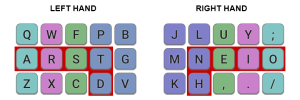
The picture attached is basically my keyboard layout and I can't switch it for QWERTY for gaming
Does anyone have a Colemak config for Input Overlay, at least a config of the left half displayed there ?
And if no one does, could someone do one based on the original wasd-extended preset?
I didn't quite understand how to edit and I'm shit at that type of thing anyway
The picture attached is basically my keyboard layout and I can't switch it for QWERTY for gaming
Does anyone have a Colemak config for Input Overlay, at least a config of the left half displayed there ?
And if no one does, could someone do one based on the original wasd-extended preset?
Attachments
The_Shiny_One
New Member
Has anyone created an N64 overlay for this plugin?
Hai, ini adalah overlay yang hebat dan sesuai dengan apa yang saya butuhkan.universallp mengirimkan sumber daya baru:
Hamparan Input - Tampilkan input keyboard dan mouse di layar
Baca selengkapnya tentang sumber daya ini...
Namun, riwayat masukan muncul saat mengetik:
A+B
C
D
E+F
Bisakah Anda membuatnya muncul sebagai satu elemen tunggal saat mengetik seperti ini?
"ABCDEF"

Monody
New Member
I made one in a pixel art style for myself. It's designed for use with an adapter that interprets the c-buttons as the right analog stick, and it requires chroma keying out the black background if you want to use it as an overlay.Has anyone created an N64 overlay for this plugin?
Attachments

NCC24656
Member
i was thinking the same thing and remembered that Linux users could use https://beta.gamepadviewer.com/ instead for nowAny chance of the Flatpak release being updated so the plugin can be used on Bazzite where Flatpak OBS is the only option?
that is
Monody
New Member
Unfortunately the main thing I use the plugin for is my keyboard, which is nonstandard.i was thinking the same thing and remembered that Linux users could use https://beta.gamepadviewer.com/ instead for now
that is
I have switched to using the package version of OBS though, so hopefully I can get the plugin working right after I figure out this websocket nonsense so my hotkeys actually function correctly...
NCC24656
Member
which package did you use cos both of them are do the same thing for me currently using bazzite my self but also used Nobara, had the same usesUnfortunately the main thing I use the plugin for is my keyboard, which is nonstandard.
I have switched to using the package version of OBS though, so hopefully I can get the plugin working right after I figure out this websocket nonsense so my hotkeys actually function correctly...
for hotkeys aswell have you trying to get this to work, currently only work around ive found so far
github.com/cfreis/obs-scripts

CrimsonessCross
New Member
Stumbled upon the 5.1.0 version and 5.0.5/5.0.6 where the Logitech G502 mouse was given an overlay (even if mine is a lightspeed I can make it work). I found the updated version for G7 and G8 buttons as mentioned and these are bound to numbers 1 and 2 on the keyboard in my experience.
And there was mention that this was only really made for a five button mouse? It's not hard to make the buttons light up otherwise in any other fashion, but there's a few buttons that Logitech has them bound to which makes it hard to detach from.
G7 and G8 and initially DPI up and down buttons and I've been trying to figure out a way to get these to reflect the button presses set on the mouse as there is no code attached to these buttons.
Is there a way that I can open up and accesses these buttons to work? I considered adding a few more definitions in the uiohook.h file for the extra mouse buttons, but haven't been stuck in this problem long enough.
I am considering on making the DPI shift button show up where the unlock wheel button is for ease if I can figure out how the buttons are set.
And there was mention that this was only really made for a five button mouse? It's not hard to make the buttons light up otherwise in any other fashion, but there's a few buttons that Logitech has them bound to which makes it hard to detach from.
G7 and G8 and initially DPI up and down buttons and I've been trying to figure out a way to get these to reflect the button presses set on the mouse as there is no code attached to these buttons.
Is there a way that I can open up and accesses these buttons to work? I considered adding a few more definitions in the uiohook.h file for the extra mouse buttons, but haven't been stuck in this problem long enough.
I am considering on making the DPI shift button show up where the unlock wheel button is for ease if I can figure out how the buttons are set.
Monody
New Member
I was able to get hotkeys working via the websocket feature and KDE Plasma's Shortcuts system, bridged by obs-cli.which package did you use cos both of them are do the same thing for me currently using bazzite my self but also used Nobara, had the same uses
for hotkeys aswell have you trying to get this to work, currently only work around ive found so far
github.com/cfreis/obs-scripts
However, I was unable to get the input overlay plugin to do any more than display a static image, because it simply has no Wayland support at this time.
I might've been willing to put up with this loss and wait for the necessary backend rewrite but I've run into other issues and gripes with Bazzite that have pushed me back into the search for a suitable distro. I'm going to see if I can get one that still supports X11 but also doesn't cause OBS to drop a third of its frames whenever a game is GPU-intensive. Wish me luck.
NCC24656
Member
I was able to get hotkeys working via the websocket feature and KDE Plasma's Shortcuts system, bridged by obs-cli.
However, I was unable to get the input overlay plugin to do any more than display a static image, because it simply has no Wayland support at this time.
I might've been willing to put up with this loss and wait for the necessary backend rewrite but I've run into other issues and gripes with Bazzite that have pushed me back into the search for a suitable distro. I'm going to see if I can get one that still supports X11 but also doesn't cause OBS to drop a third of its frames whenever a game is GPU-intensive. Wish me luck.
i think its to do with Linux itself not the plugins or obs, due to hotkeys and plugin issues ive came across i fix half of 75% of my issues but with the overlay stuff it dosnt even work with NohBoard overlay app its a shame
the big problem is having linux with Wayland ive seen so many topics online about this and their been a fix but since the current updates still dosnt work now again, also seen topics that talk about the OBS team needs to update the Linux version to get hotkeys and overlays to work correctly too
Ive also run Bazzite and i dont have any issues of dropping fps in games or obs too, ill share a screenshot of stats on obs after doing a stream if ya like