

Big thanks, it's actually working as you said :D. Those other files in the presets folder are pretty confusing xD.[[deepl translated]]
You have chosen the wrong overlay image file.
Select wasd.png for the overlay image file and it will work correctly.
I made the same mistake.
I think that "preview" file is just a preview not work.
Thanks
You are using an out of date browser. It may not display this or other websites correctly.
You should upgrade or use an alternative browser.
You should upgrade or use an alternative browser.

Input Overlay v5.0.5
- Thread starter univrsal
- Start date

univrsal
Active Member
I updated the link on the wikiHey all!
I'm trying to figure out how to get Input History working. I found the documentation here about it, but the second link 404s, and as someone without coding experience I'm really not sure that I can get it working without some step-by-step help.
Hey there! I'm still getting an error...I updated the link on the wiki
That's the link I'm clicking, and it's bringing me here:
univrsal
Active Member
I guess I didn't save the change. Try again, but if for some reason I fucked up again just use this link:Hey there! I'm still getting an error...
View attachment 91920
That's the link I'm clicking, and it's bringing me here:
View attachment 91921
input-overlay/presets/input-history-windows at master · univrsal/input-overlay
Show keyboard, gamepad and mouse input on stream. Contribute to univrsal/input-overlay development by creating an account on GitHub.
 github.com
@universallp you didn't add the client program to the releases and I'm having issues with CMake so i cant build it myself
Does any version for work anyone on Wayland? I am using version 5.0.0 and on Sway and Archlinux, screen recording is fine with https://wiki.archlinux.org/title/Xdg-desktop-portal#WebRTC_screen_sharing, and input overlay events display fine for a gamepad, but the keyboard events or mouse events are not recognized. Is there a way to debug and fix this?
Shortcuts don't work when OBS is not in focus, but this is probably not related to the input overlay issue since I would expect the input overlay to work when OBS is in focus.
All is fine on i3, and X11, I am loving the mouse movement indicator.
Shortcuts don't work when OBS is not in focus, but this is probably not related to the input overlay issue since I would expect the input overlay to work when OBS is in focus.
All is fine on i3, and X11, I am loving the mouse movement indicator.
univrsal
Active Member
Wayland doesn't support input hooking. https://github.com/kwhat/libuiohook/issues/100Does any version for work anyone on Wayland? I am using version 5.0.0 and on Sway and Archlinux, screen recording is fine with https://wiki.archlinux.org/title/Xdg-desktop-portal#WebRTC_screen_sharing, and input overlay events display fine for a gamepad, but the keyboard events or mouse events are not recognized. Is there a way to debug and fix this?
Shortcuts don't work when OBS is not in focus, but this is probably not related to the input overlay issue since I would expect the input overlay to work when OBS is in focus.
All is fine on i3, and X11, I am loving the mouse movement indicator.
Thank you so much, I got it working!!I guess I didn't save the change. Try again, but if for some reason I fucked up again just use this link:

input-overlay/presets/input-history-windows at master · univrsal/input-overlay
Show keyboard, gamepad and mouse input on stream. Contribute to univrsal/input-overlay development by creating an account on GitHub.
dannyrodcam
New Member
Will it work for mac in the near future?

Mizumi
New Member
The Overlay is just totaly awsome and i could never ask and dream for more bc it simply works ♥
I just use the wasd-minimal version and would love to know if it's possible to add a second input option?
bc i'm handycaped i can not always hit the ctrl with my Pinky so i usualy use the alt key with my thumb.
And now i was just looking for a option to make this happend but i have no idea what i needed to change in the ini to make that work
I just use the wasd-minimal version and would love to know if it's possible to add a second input option?
bc i'm handycaped i can not always hit the ctrl with my Pinky so i usualy use the alt key with my thumb.
And now i was just looking for a option to make this happend but i have no idea what i needed to change in the ini to make that work
univrsal
Active Member
universallp updated Input Overlay with a new update entry:
New Gamepad backend, remote connection fixes
Read the rest of this update entry...
New Gamepad backend, remote connection fixes
Most gamepads should now work out of the box thanks to SDL2
The remote connection should now reliably transfer all events without keys sometimes getting stuck.
There's also a tutorial for installing and using this version on the resource page.
Read the rest of this update entry...
BedlessSleeper
New Member
Hey, I recently updated the OBS Plugin to the newest version and now my OBS crashes constantly whenever a new Controller device has been discovered or if I open the Properties information once a new device has been discovered. The strange thing is, is that my plugin works fine and OBS works fine, if I have no controllers plugged in, open the properties tab, then plug in my controller, OBS doesn't crash and I can see the plugin work through the visual responses of button presses. However, if another controller is detected, say I also plugin another controller, OBS either instantly crashes with no error report possible or sends me an error saying OBS has crashed asking for me to copy the error log into a clipboard. If this occurs, OBS still works perfectly fine and has no issue, but if I click yes OBS closes.
Hope this gets fixed soon, as sometimes while streaming my controller sometimes disconnects because the wire is flimsy, and it would cause OBS to crash instantly. Not really sure why :/
Here is the error log in a paste bin: https://pastebin.com/hcQZxyTz
Hope this gets fixed soon, as sometimes while streaming my controller sometimes disconnects because the wire is flimsy, and it would cause OBS to crash instantly. Not really sure why :/
Here is the error log in a paste bin: https://pastebin.com/hcQZxyTz
univrsal
Active Member
Try this build and see if that fixes the issue.Hey, I recently updated the OBS Plugin to the newest version and now my OBS crashes constantly whenever a new Controller device has been discovered or if I open the Properties information once a new device has been discovered. The strange thing is, is that my plugin works fine and OBS works fine, if I have no controllers plugged in, open the properties tab, then plug in my controller, OBS doesn't crash and I can see the plugin work through the visual responses of button presses. However, if another controller is detected, say I also plugin another controller, OBS either instantly crashes with no error report possible or sends me an error saying OBS has crashed asking for me to copy the error log into a clipboard. If this occurs, OBS still works perfectly fine and has no issue, but if I click yes OBS closes.
Hope this gets fixed soon, as sometimes while streaming my controller sometimes disconnects because the wire is flimsy, and it would cause OBS to crash instantly. Not really sure why :/
Here is the error log in a paste bin: https://pastebin.com/hcQZxyTz
BedlessSleeper
New Member
Thank you, it seems to work and no longer crash now! I do have another side issue which I believe is directly related to the kind of controller I'm trying to detect. For some reason, the plugin does not detect my Custom Mixbox controller unless I unplug and plug it back in, AND it is the only controller plugged in at the time. If I were to connect another controller such as a PS5 controller after having my Custom MixBox controller detected and working fine, and I switch to the PS5 controller, the plugin no longer displays my Custom Mixbox controllers existence and I would have to unplug all controllers and plug in my Custom Mixbox controller in, then connect it.Try this build and see if that fixes the issue.
Attachments

Hi! New to the forum
Is there any page that collects community-made presets? I'm not a very creative person and wouldn't know how to make my own graphics for it, even if I learn how to use the preset tool, and find the basic Overwatch style kinda ugly. Thanks in advance!!
Is there any page that collects community-made presets? I'm not a very creative person and wouldn't know how to make my own graphics for it, even if I learn how to use the preset tool, and find the basic Overwatch style kinda ugly. Thanks in advance!!

craftykaname
New Member
Which version should I download for OBS 27.2.4? The newest one doesn't work for my version of OBS as it is made for 28 (I will not be updating to 28 soon, due to other plugins). Thanks in advance!

anchaides
New Member
I've been toying around with input overlay 5.03 and OBS 29.0 using P010 and REC2100 color space for HDR recording.
There seems to be an issue with how the image itself is drawn. By comparison, if I grab the overlay png and add it as an image source, the image plugin uses the correct color space matching that of the one set on OBS advanced options. Input overlay always use the same pixel format and color space by default and there's no option to change it perhaps?
I've been diving into the code but I am not familiar with neither the API nor the plugin itself I wouldn't know for sure but I don't see this gets defined anywhere. if I change back to the original color format and color space, the overlay gets displayed correctly. I don't think this is a bug but rather a missing support option I guess?
How does input_overlay let OBS know what color format is to be used for this source?
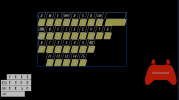
There seems to be an issue with how the image itself is drawn. By comparison, if I grab the overlay png and add it as an image source, the image plugin uses the correct color space matching that of the one set on OBS advanced options. Input overlay always use the same pixel format and color space by default and there's no option to change it perhaps?
I've been diving into the code but I am not familiar with neither the API nor the plugin itself I wouldn't know for sure but I don't see this gets defined anywhere. if I change back to the original color format and color space, the overlay gets displayed correctly. I don't think this is a bug but rather a missing support option I guess?
How does input_overlay let OBS know what color format is to be used for this source?