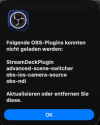
Hi, I didn't use for about 2 years Obs anymore. Now I upgraded to the latest version of Obs for my MacBook Pro 2019 with Tahoe 26.1
Now every time when I open Obs I get the attached message that the sown plugins have to be updated or deleted. I deleted OBS completely from my my ( obviously not 100% ) . I went to finder- library- application support - and deleted here the Obs folder. , deleted then the trash folder and rebooted my Mac. installed latest Obs version , installed it a still the same message. Is there anyone who can help? thanks
Now every time when I open Obs I get the attached message that the sown plugins have to be updated or deleted. I deleted OBS completely from my my ( obviously not 100% ) . I went to finder- library- application support - and deleted here the Obs folder. , deleted then the trash folder and rebooted my Mac. installed latest Obs version , installed it a still the same message. Is there anyone who can help? thanks